In building Delta Dynamics, a low-poly ecosystem simulator, we wanted a world that felt hydrodynamically alive. Water shouldn’t just be a static visual plane; it should rain down, infiltrate the soil, accumulate in aquifers, flow down mountains, erode terrain, saturate soil, and form dynamic rivers and lakes that direct the growth of vegetation and the behaviors of AI entities.
Simulating this level of cellular hydrology in real time on a $100 \times 100$ grid is computationally heavy. If run on the CPU in JavaScript, updating 10,000 cells every frame alongside 3D rendering, entity AI, and local Web-LLM processing would quickly tank the frame rate.
To achieve a solid, lag-free 60 FPS in the browser, we offloaded the entire water cycle simulation to the GPU. By leveraging WebGL custom shaders via Three.js and a double-buffered Framebuffer Object (FBO) pipeline, we turned a heavy physics loop into a sub-millisecond graphics pass.
This post breaks down the mathematics of our discrete grid hydrology model, the double-buffering architecture, and the visual shader techniques used to render a beautiful, responsive low-poly water surface.
1. The Physics Model: Integrated Surface & Subsurface Hydrology
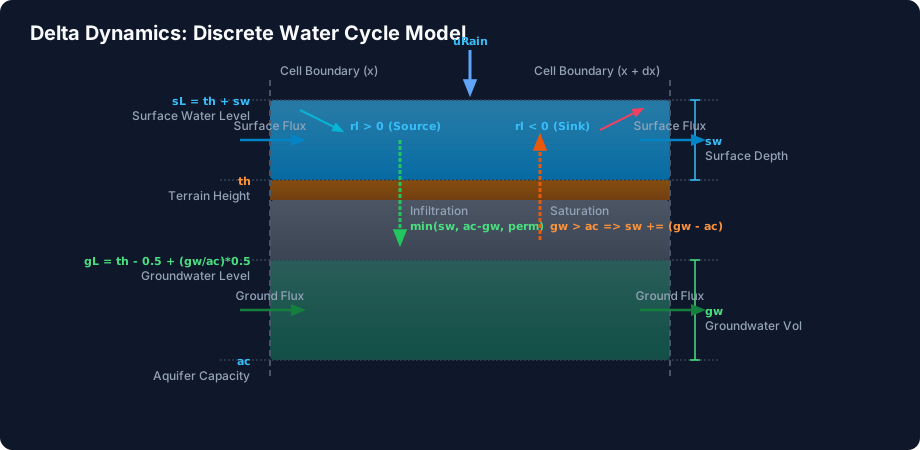
Most game water systems use simple wave-height maps (like Gerstner waves) that look nice but carry no physical volume. For an ecosystem simulator, we need mass-conserving volumetric water flow. We designed a coupled model comprising two main layers: Surface Water and Groundwater (Aquifers), connected by vertical fluxes.
Lateral Surface Water Flow (Diffusion & Flux Clamping)
We approximate the shallow water equations using a cell-centered, discrete height-based diffusion model. For each grid cell, we evaluate its 4-neighborhood (Up, Down, Left, Right).
The flow flux between a cell and its neighbor is driven by the difference in their total surface levels ($sL$), where $sL$ is the sum of the terrain elevation ($th$) and the surface water depth ($sw$):
$$sL = th + sw$$
The shader compares the local surface level with the neighbor’s level ($nSL$):
$$sDiff = sL - nSL$$
If $sDiff > 0$, water flows out to the neighbor; if $sDiff < 0$, water flows in. To prevent numerical instability and wild oscillations (where water sloshes back and forth indefinitely), we apply a safety flux clamp (analogous to the CFL condition in fluid dynamics). In our fragment shader simulation.frag.ts, the outflow is capped at $30%$ of the current cell’s water depth:
float sDiff = sL - nSL;
if (sDiff > 0.0001) {
    float f = sDiff * 0.22; // flow rate coefficient
    float clampedF = min(f, sw * 0.3); // clamp to prevent over-draining
    sDelta -= clampedF;
} else if (sDiff < -0.0001) {
    float f = -sDiff * 0.22;
    float clampedF = min(f, max(0.0, nWater.r - nSurface.r) * 0.3);
    sDelta += clampedF;
}
Subsurface Aquifer Flow (Darcy’s Law)
Beneath the surface, water permeates through porous soil layers (humus, sand, gravel, and rock). The groundwater level ($gL$) represents the hydraulic head inside the soil and is calculated based on the current groundwater volume ($gw$) relative to the aquifer’s capacity ($ac$):
$$gL = th - 0.5 + \left(\frac{gw}{ac}\right) \times 0.5$$
Groundwater flows laterally between adjacent cells following a simplified version of Darcy’s Law, where the flow rate is proportional to the hydraulic gradient ($gL - nGL$) and restricted by a much lower diffusion coefficient ($0.005$) compared to surface water ($0.22$):
float nGL = nSurface.r - 0.5 + (nAC > 0.0 ? (nWater.g / nAC) * 0.5 : 0.0);
float gDiff = gL - nGL;
if (gDiff > 0.0001) {
    float f = gDiff * 0.005;
    float clampedF = min(f, gw * 0.25);
    gDelta -= clampedF;
}
Vertical Fluxes: Infiltration & Saturation
Water moves vertically between the surface and the aquifer based on two physical processes:
-
Infiltration: Gravity forces surface water to sink into the soil. The rate of infiltration is dictated by the soil permeability ($perm$) of the top-most soil layer (e.g., pavement blocks infiltration, sand allows high infiltration):
$$amt = \min(sw, \min(ac - gw, 0.001 \times \frac{perm}{0.2}))$$
-
Saturation & Exfiltration: If the aquifer is fully saturated ($gw > ac$), the soil cannot hold any more water. The excess groundwater is immediately pushed back to the surface ($sw += gw - ac; gw = ac$), creating puddles, springs, and waterlogged swamps.
2. WebGL Architecture: FBO Ping-Ponging
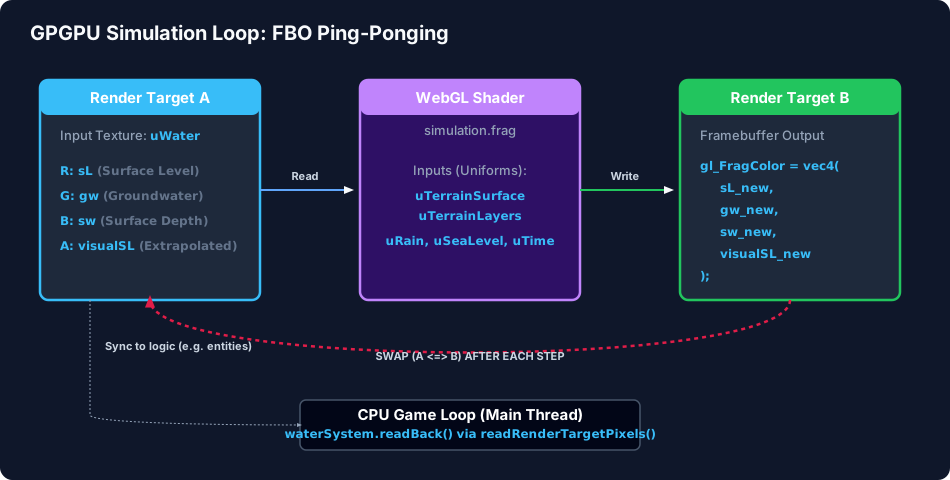
To run this cellular automata model on the GPU, we store the physical state of the grid in floating-point textures and run a double-buffered simulation loop.
Data Layout in Textures
We pack our grid variables into two main textures:
- Water State Texture (
uWater): A 2D Float texture storing the dynamic water quantities:- R: Surface Level ($sL$)
- G: Groundwater volume ($gw$)
- B: Surface Water depth ($sw$)
- A: Visual extrapolated surface water level (used for rendering smooth shorelines)
- Terrain Surface Texture (
uTerrainSurface): A 2D Float texture storing static and dynamic terrain variables:- R: Pre-calculated total height ($th$)
- G: River source/sink level ($rl$)
- B: Top soil material index (used for permeability lookup)
- A: Aquifer capacity ($ac$)
The Double-Buffering Loop
Since a shader cannot read from and write to the same texture simultaneously, we initialize two WebGL Render Targets (renderTargetA and renderTargetB).
In each simulation step, we:
- Bind the current state (
renderTargetA.texture) to the shader uniformuWater. - Render a full-screen quad using an orthographic camera into
renderTargetB. The fragment shader computes the hydrology math and writes the new state togl_FragColor. - Swap (ping-pong) the targets:
renderTargetAbecomes the new input, andrenderTargetBbecomes the next write destination.
This swap occurs inside waterSystem.ts:
public step(rain: number, inflow: number, seaLevel: number, time: number, ...) {
    this.computeMaterial.uniforms.uWater.value = this.renderTargetA.texture;
    this.computeMaterial.uniforms.uRain.value = rain;
    this.computeMaterial.uniforms.uInflow.value = inflow;
    this.computeMaterial.uniforms.uSeaLevel.value = seaLevel;
    this.computeMaterial.uniforms.uTime.value = time;

    const prevTarget = this.renderer.getRenderTarget();
    this.renderer.setRenderTarget(this.renderTargetB);
    this.renderer.render(this.scene, this.camera);
    this.renderer.setRenderTarget(prevTarget);

    // Swap Render Targets (Ping-Pong)
    const tmp = this.renderTargetA;
    this.renderTargetA = this.renderTargetB;
    this.renderTargetB = tmp;
}
Asynchronous CPU Readbacks
While the graphics card handles the physics math, CPU game logic still needs to know where the water is (e.g., so trees can consume groundwater, or so humans don’t drown). We implement readBack() which calls renderer.readRenderTargetPixels to transfer the float texture data back to CPU-accessible Float32Arrays. To keep performance high, this readback is throttled or run asynchronously to prevent blocking the GPU command pipeline.
3. Creating the Low-Poly Water Aesthetic
Simulated water is represented on a flat 2D grid texture. However, we want it to look like a stylized, volumetric low-poly surface. We achieve this with custom vertex and fragment shaders.
Vertex Shader: Smooth Wet-Neighbor Extrapolation
If we displacement-map a 3D grid mesh using raw water depths, dry cells would drop off sharply, resulting in jagged, blocky stair-step water edges. To make the water flow look organic:
- Visual Extrapolation: In the simulation shader, we calculate a weighted average of wet neighbor heights and store this in the alpha channel (
visualSL) ofuWater. - Neighbor Level Averaging: In the vertex shader surface.vert.ts, we look up the 4 corner points of the quad and interpolate their
visualSLvalues. - Dry-Vertex Sinking: If a vertex has no wet neighbors, we set its height to
h - 0.05(sinking it slightly below the terrain) to hide it. - Wave Animation: If the local water depth is greater than $0.05$, we add a small time-based sine wave to give the water a gentle ripple:
if (sw_interp > 0.05) {
  transformed.y += sin(uTime * 2.0 + (position.x + position.z) * 5.0) * 0.005;
}
Fragment Shader: Depth Gradient, Shorelines, & Grid Lines
The fragment shader surface.frag.ts styles the water surface using depth-based gradients and custom highlights:
- Depth-Based Color: We calculate the depth ($vDepth$) as the difference between the water surface height and the terrain height. We mix a vibrant sky blue (shallow) and a dark navy blue (deep) using
smoothstep:vec3 shallowColor = vec3(0.2, 0.5, 0.8); vec3 deepColor = vec3(0.02, 0.1, 0.3); vec3 waterColor = mix(shallowColor, deepColor, smoothstep(0.0, 0.5, vDepth)); - Wet Edge Shorelines: Instead of a hard, ugly intersection line between the water mesh and the terrain, we fade the water color into the terrain color as $vDepth$ approaches zero. This gives the shoreline a smooth “wet sand” look.
- Dynamic Source/Sink Pulses: When a river source (
rl > 0) or drain (rl < 0) is active, we add a color pulse usingsin(uTime * 3.0). Sources pulse a bright, cyan energy wave, while sinks pulse a red/orange whirlpool effect. - Procedural Grid Lines: To match the voxel/grid theme, we overlay subtle grid lines by taking the fractional coordinates:
fract(vGridUv * 100.0).
4. Conclusion
By combining discrete cellular automata logic with GPGPU techniques, Delta Dynamics achieves a rich, physically active hydrological cycle in a standard web browser. Offloading the lateral diffusion and vertical infiltration equations to WebGL shaders guarantees that the water simulation stays incredibly fast, leaving the CPU free to focus on entity logic, pathfinding, and local LLM AI agents.
This hybrid approach demonstrates that modern browsers are fully capable of hosting complex, real-time physical simulations, bringing premium desktop-grade simulation mechanics directly to web applications.