After modernizing my personal website to Astro and TypeScript, I wanted to find a way to make it more engaging for returning visitors. Specifically, I wanted to highlight newly published content (such as blog posts, projects, courses, publications, and visualizations) that a user has not seen yet.
However, since this website is fully static and hosted on GitHub Pages, there is no server-side database or user authentication to track read states. Everything has to happen client-side.
This post details how we built a type-safe, client-side unread content tracking system that resolves the classic user experience challenge of asynchronous state loading: the visual flicker (Layout Shift).
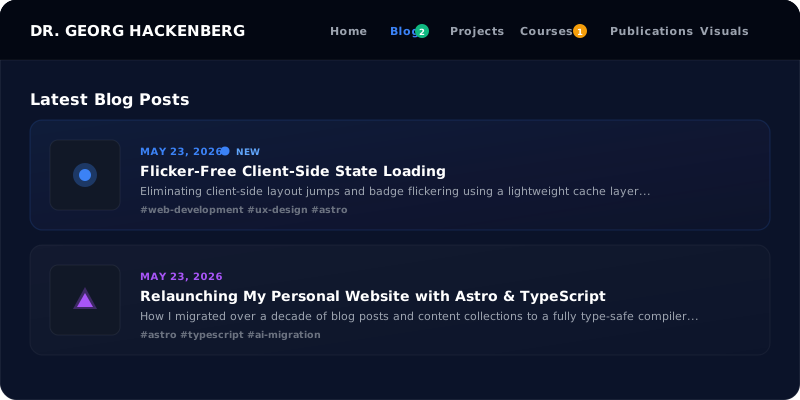
The UI Mockup: Where Indicators Live
We wanted a visual system that instantly guides users. The final interface features two levels of unread notifications:
- Navbar Badges: Colored, rounded numeric counts (matching the section’s accent color) indicating the total number of unread items in that collection.
- Card Indicators: A subtle glowing dot next to the date header on cards representing content that has not yet been visited.
Here is a mockup of the visual interface:
The Core Challenge: The Visual Flicker
A standard approach for client-side state is to load an asynchronous JavaScript script, read localStorage, fetch a manifest of posts, and inject the badges into the DOM.
While simple, this pattern introduces a major UX flaw: Visual Flickering. Because async scripts execute after the DOM is rendered and styled, the user will see the navbar without badges for a split second, followed by a sudden jump as badges and unread dots pop into existence. This layout shift looks unpolished and cheap.
To achieve a flicker-free experience, we designed a decoupled synchronization architecture.
Decoupled Architecture: Build-Time meets Client-Time
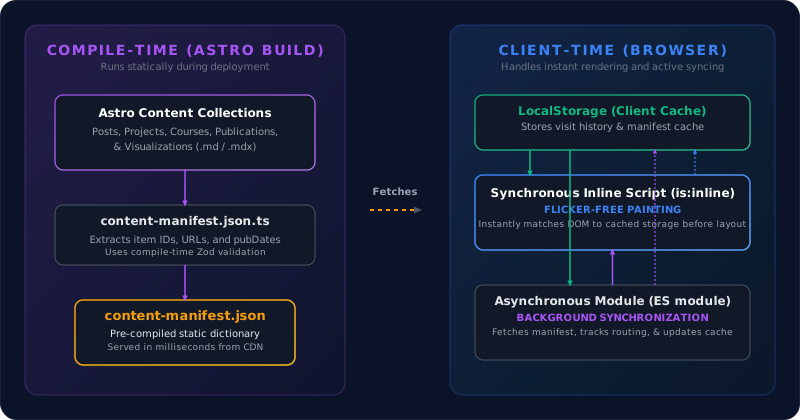
To make indicators render instantly, we split our system into three layers:
- Build-Time Manifest Generation: A static endpoint compiled during deployment.
- Synchronous Inline Painting: A tiny render-blocking inline script that uses local cache to update the UI before the browser paints.
- Background Asynchronous Syncing: A full-featured module that tracks user navigation, fetches the latest manifest, updates
localStorage, and handles new items.
1. Build-Time Content Manifest
First, we created a dynamic endpoint src/pages/content-manifest.json.ts that runs during the Astro build process. It fetches all content collections, extracts their URLs and publication timestamps (validated by Zod schemas), and output a single, pre-compiled static JSON file:
export async function GET() {
  const posts = await getCollection("posts");
  const courses = await getCollection("courses");
  const projects = await getCollection("projects");
  const publications = await getCollection("publications");
  const visualizations = await getCollection("visualizations");

  const manifest = {
    posts: posts.map(p => ({ id: p.id, url: `/posts/${p.id}`, date: parseItemDate(p.id, p.data.pubDate) })),
    courses: courses.map(c => ({ id: c.id, url: `/courses/${c.id}`, date: parseItemDate(c.id, c.data.pubDate) })),
    // ... other collections
  };

  return new Response(JSON.stringify(manifest), {
    headers: { "Content-Type": "application/json" }
  });
}
2. Synchronous Inline Painting (Flicker-Free)
To completely prevent the layout flash, we injected a synchronous, inlined script block (is:inline) right at the bottom of the <body> in our main layout Layout.astro.
Because this script is inlined and simple, it executes synchronously during the initial HTML rendering loop. It reads the user’s notification state and the cached content manifest directly from localStorage, instantly toggling the visibility of .unread-dot and .nav-badge DOM nodes before the browser executes the first paint:
<script is:inline>
  (function() {
    const STORAGE_KEY = 'gh_site_notifications_v1';
    const MANIFEST_CACHE_KEY = 'gh_content_manifest_cache';

    // 1. Read state
    let state = { lastVisitedSections: {}, visitedItems: {} };
    try {
      const stored = localStorage.getItem(STORAGE_KEY);
      if (stored) state = JSON.parse(stored);
    } catch(e) {}

    // 2. Instantly update unread dots
    const unreadDots = document.querySelectorAll('.unread-dot');
    unreadDots.forEach(dot => {
      const rawUrl = dot.getAttribute('data-item-url');
      if (rawUrl) {
        const isVisited = !!state.visitedItems[normalizePath(rawUrl)];
        if (!isVisited) dot.classList.remove('hidden');
      }
    });

    // 3. Instantly update navbar badges using cached manifest
    // ...
  })();
</script>
3. Background Asynchronous Syncing
Once the page is rendered, our primary client-side TypeScript module src/scripts/notifications.ts runs asynchronously in the background. Its job is to:
- Track Page Visits: If the user is viewing
/posts, it updates thelastVisitedSections['posts']timestamp. If they view an article like/posts/my-post, it flags the item URL as visited. - Fetch Manifest: It queries the static
/content-manifest.jsonon the server. - Update Cache: It recalculates the unread item counts using the fresh data, updates any badges if a new post has been published since their last cached visit, and writes the updated manifest back into the
localStoragecache for the next page load.
State and Event Workflows
The sequence diagram below displays the step-by-step workflow of the client state machine when a user triggers a page request:
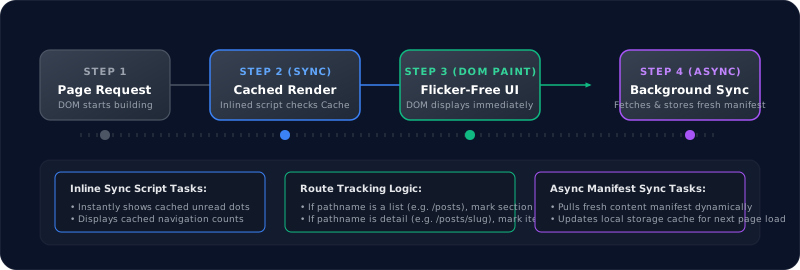
By utilizing the cached manifest cache from the previous session, the client is able to execute Step 2 synchronously. When the background fetch completes in Step 4, if there is a discrepancy (e.g., a new article was published since the user last refreshed), the UI updates smoothly, ensuring they always have accurate, real-time unread counts without sacrificing performance.
Summary of Benefits
This decoupled notification architecture provides several major advantages:
- Zero Cumulative Layout Shift (CLS): The client paint phase always has access to the cached values, meaning badges are shown immediately, preventing layout flickering.
- Static Compilation: The server never has to execute dynamic database queries. The manifest is pre-compiled at build time and served globally via a fast CDN.
- No Database Dependencies: Users are tracked anonymously on their own machines using local storage, keeping the application fast, privacy-friendly, and cost-effective.
Implementing this pattern ensures that static sites feel as reactive and feature-rich as complex single-page apps, while retaining all the speed and security benefits of pre-rendered HTML.