The solution for user synchronization and event propagation is a so-called distributed event bus. The idea of this bus is, to provide a component where several clients can connect for publishing and recieving events. The component guarantees that any event propagated will also be recieved by all clients interested. Similar techniques have already been used for implementing Google’s GMail and Wave applications. These use the distributed event bus for notifying the user of new emails, chats and much more.
To get started with my simple prototype, I posted a video on YouTube which demonstrates the basic capabilities of the system. In the demo, I use two browsers for accessing the distributed event bus. This simulates the use case where two independent clients log in from possibly varying locations.
Now, let’s understand how the implementation of this simple prototype works. Therefore, I prepared a figure illustrating the architectural structure of the system. The main decompostion is done by client and server, each refering to the web browser and the web server respectively. Both comunicate via the HTTP protocol, which is the standard protocol for web content retrieval. This protocol is also used by AJAX for reloading page fragments from the server or uploading content from the client without the need of reloading the entire page. Finally, for each entity the individual subcomponents are depicted which I will discuss later.

Now, let’s have a look at each subcomponent in isolation.
From this presentation I hope to give the best possible insight into the system.
If you have further questions, do not hesitate to send me a message or comment on this article.
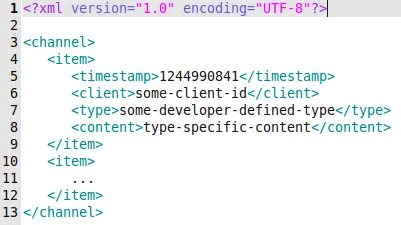 The channel is the heart of the system.
It is stored on the server and basically denotes a regular XML file storing all events in a circular log file fashion.
Circular log file means, that only a maximum number of entries is stored.
If this limit is reached, the oldest entries are being deleted saving space for new ones.
This is an effective method for saving hard disk memory on your system which is also used by many other applications and software packages like DB2.
The format of the log file is shown in the figure to the right.
At its root, a
The channel is the heart of the system.
It is stored on the server and basically denotes a regular XML file storing all events in a circular log file fashion.
Circular log file means, that only a maximum number of entries is stored.
If this limit is reached, the oldest entries are being deleted saving space for new ones.
This is an effective method for saving hard disk memory on your system which is also used by many other applications and software packages like DB2.
The format of the log file is shown in the figure to the right.
At its root, a channel element is defined which holds a possibly infinite number of item elements.
The items store the actual events that have occured during system operation.
Each item provides information about the time, client, type and content of the event.
The time is given in timestamp format, i.e. the elapsed number of seconds since January 1, 1970.
The client currently stores a randomly generated ID, which is assigned to each web browser instance upon page entrance.
The event type and content are arbitrary, i.e. they can be tailored to any specific need like transmitting login events, keypress events or higher level activities.
The other two server-side components are the publish and update script.
The first takes care of inserting new item elements into the channel.
The event information is passed using HTTP GET and HTTP POST requests.
The second takes care of retrieving updated event information from the channel.
Therefore, the last timestamp seen by the client is passed as an HTTP GET parameter.
Each more recent item is delivered by the script in the same format as defined by the channel data structure.
For concurrency reasons, both scripts first acquire a lock for the file before reading or writing its contents.
This simple filesystem based synchronization method works well in the PHP domain.
Finally, the client-side components are left for discussion. The core of the client deployment is a general JavaScript API which allows to connect to channels, register event handlers and publish events. The skeleton of the current implementation is presented in the following figure. Most implementation details are removed for clarity of the illustration.

The first thing to notice is the client variable.
It holds the randomly generated ID of the current client.
This ID is passed as a signature for each event to distinguish its origin.
Now, let’s quickly loop through all methods provided by the API:
First, there is the function HandleEvent.
It is called for every event recieved via the event bus.
Its responsibility is to call the respective event handlers which have been registered for the individual event types.
Second, there is the function Publish which requires a type and a content argument.
It is used for transmitting new events into the distributed event channel.
The type and the content parameters can be filled arbitrarily.
This keeps the system task-agnostic to the most possible extent.
The next key function is Connect.
It provides the entrace point to event listing on the distributed channel.
Its implementation is fairly simple: Basically, a get request is issued for the update component on the server-side providing the timestamp of the client.
When the request is finished, the method Update is called for handling the new event content.
The Update method also takes care of running a event retrieval loop.
Finally, there are the functions Register and Unregister each requiring an event type and an event handler.
They are used for managing the event handler registry for the specific event types.
The last thing left is the actual client code which utilizes the JavaScript API. For demonstration purposes I provide a truncated code snippet which hopefully explains the basic principles. The snippet is taken from the demo chat application shown in the initial video sequence.

Again, first a word about the variable timestamp.
Initially, it holds the server timestamp when the page was delivered to the client.
Accordingly, it defines up to which point in time changes are already reflected in the initial content.
Then, successively the timestamp value is upated with each iteration through the Update loop.
This way, only the most recent changes are transfered to each client.
Now, let’s concentrate on the provided methods:
First, there is the method Say which expects a form parameter.
The parameter refers to the HTML form holding the message the client wants to say.
When executed, the method publishes an event of type message.
The content of the event is the text string contained in the HTML input form.
Finally, the form is cleared for further user input.
This is already a simple example of how to use the distributed event bus for synchronizing events between clients.
Next, there are the UpdateUserList and UpdateMessageList methods.
These are two examples of event handlers which are registered in a later step.
Their signature is predefined, i.e. all event handlers retrieve the same list of parameters.
The parameter names are self-explanatory, they basically contain the item information for each event.
Usually, the event handlers are used to update the user interface, e.g. by displaying updated content or triggering alerts.
Thelast step in the script is the call to the method Connect.
This call initiates the AJAX connection between the client and the server.
I hope you enjoyed the demonstration of this sweet little piece of technology. If you have further questions or want to play with the code, just drop me a line.