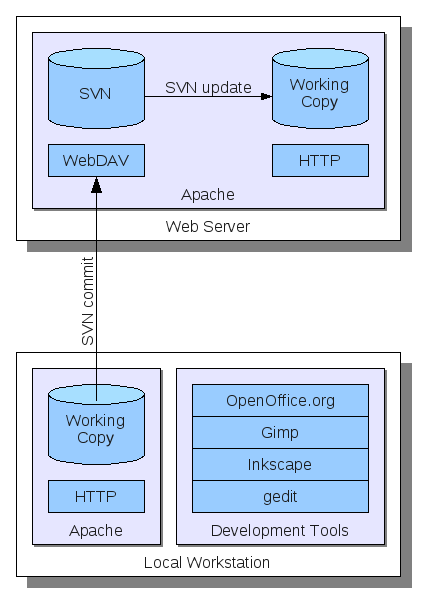
 The general infrastructure of the online publication system is depicted in the figure to the right.
Most importantly, I have a *Subversion* repository installed on my *Apache* web server which is accessible via *WebDAV*.
This respository contains the entire website from the front page to all articles including the comments.
The general infrastructure of the online publication system is depicted in the figure to the right.
Most importantly, I have a *Subversion* repository installed on my *Apache* web server which is accessible via *WebDAV*.
This respository contains the entire website from the front page to all articles including the comments.
On my local workstation I have a working copy of the repository checked out and connected to a local Apache installation. Here, I can make changes to the content as well as server-side components such as PHP scripts and directly see the changes. When I am finished updating the website I can commit the changes to the repository which causes the files to be uploaded to the webserver.
On the webserver, the Apache implementation of WebDAV recognizes the Subversion commit and updates the respository database. For the repository, additionally a post-commit hook is configured, which automatically updates a working copy which represents the actual online version. Now people browsing my website can see the changes I made locally on my development machine.
Having said enough about the infrastructure of the publication system I now explain the server-side components. First, let’s have a look at the index page: The index page provides a list of all articles posted to this Blog which is devided into media categories. The four different media categories currently supported are article, multimedia, link and announcement. The posts for each category are stored within a separate folder. To generate the media lists, these folders are traveresed and the contents are extracted. Here is a code fragment from the index page:

The function listMedia takes the path of the folder and the style to use as a parameter.
In return, it generates li HTML list items containing a reference to the article and some meta information.
You can also see the link to the RSS feed.
The feed resuses the function listMedia with a different style as shown in the next example:

Here, the function generates item elements for the RSS feed.
The feeds for the other media types are implemented in the same way.
As we have seen, the media listing functionality can be shared by several parts of the website.
This makes it possible, to centralize the extraction of article information.
Different styles are achieved by specifying the name of a callback function (e.g. rssFormat or htmlFormat).
Having seen how articles are listed, we now have a look at the articles themselves. Articles basically are just simple HTML pages stored in a category folder. The following code listing shows an example taken from this website:

Each article has to define a title, a date and a tagline.
These information items are considered as meta-data and displayed in media listings such as the front page and the RSS feeds.
The function listMedia which has been introduced before basically extracts these attributes using regular expressions and passes it to the formatting functions.
The rest of the article is basic HTML and can contains simply anything you want from embedded Youtube videos to JavaScript applications.
Additionally, articles provide the means for posting comments by any user on the web. Therefore, the HTML structures for representing the comments as well as a post form are included at the bottom of the page. Here is an example from the previously discussed article example:

The comment part of articles is contained within a dedicated div fragment.
The fragment basically contains an ordered list (represented as an ol element) for storing the individual posts by different users.
Each post stores the date, the URL of the homepage, the author name and its content.
Additionally, an email address can be attached which is stored within PHP tags.
This is due to keeping the email private, i.e. it will never be returned to the web browser, but can be extracted within server-side components using for example regular expressions.
Finally, let’s have a look what happens when a user posts a comment. Basically, a script is executed checking the integrity of the data and initiating the permanent storage. Additionally, an email is sent to those users which have specified an email address within their post. The following code fragment shows what happens after sending this email:

In the first lines, a new HTML fragment is created from the comment which conforms to the structure shown before.
Then this fragment is inserted into the article using the function preg_replace (this function is regular expression based).
After updating the content, the results are written back to the article file and the changes are commited to the repository.
This makes it possible to retrieve all updates also on the development system, i.e. my local machine.
At last, the user is redirected to the same page againg targeting the comment section (using the #comment suffix).
When reloading the page, the user will already get the new version with the updated comment section.
Well, that’s how my Blog works. I hope you liked the introduction into lightweight blogging ;). It would be great to get some comments about it.